CacheWarm v0.5.2

Dashboard / status line / tray

A window into every timer.

Cache Warm is mostly invisible: a hook, a sleeping waker, and one line on your status bar. The local dashboard is where all of it becomes observable — one row per session, one tab per scope, and analytics built from your own transcripts.

ccw dashboard HTTP API contract →
127.0.0.1:4777 — sample data
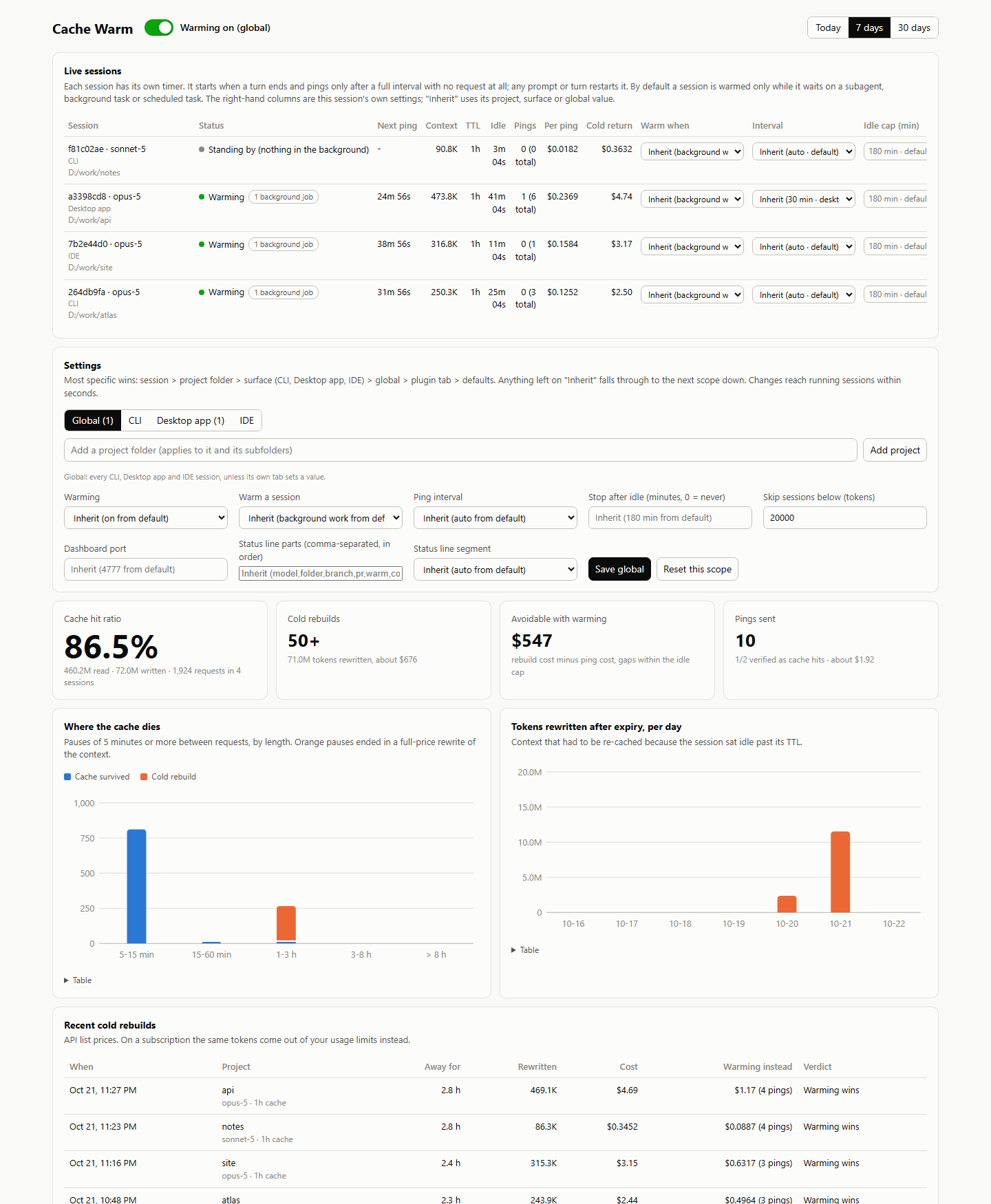
The Cache Warm dashboard: live sessions, scope settings, cache hit ratio, cold rebuilds and recent rebuild table
Real dashboard, sample sessions. Analytics are computed read-only from ~/.claude/projects/**/*.jsonl.

01 Live sessions

Every session, its own countdown.

Each open session gets a row: session id and model, surface and project, status, next ping, context size, cache TTL, time since activity, pings since activity, the estimated cost of one ping and of a cold return, and the session's own settings.

“Inherit (…)”, on a per-session control, shows the value the session would get otherwise and where it comes from. Pause, Resume and Reset act on that one session only.

  • Warming — a live timer is counting down
  • Turn in progress — the conversation is refreshing its own cache
  • Standing by — nothing pending in the background
  • Cache expired — deliberately not re-written

02 Settings

One panel for every scope.

Tabs for Global, CLI, Desktop app, IDE, and each project folder. Every field starts on “Inherit”; pick a value to set it at that tab's scope, or set it back to Inherit to clear it.

“Add project” creates a scope for any folder (suggestions come from your sessions' folders). “Reset this scope” clears everything at that scope. Changes reach running sessions within seconds — no restart.

session›project›surface›global

The global tab is the only place that edits dashboardPort, statusline and statuslineSegments.

03 Analytics

What your pauses actually cost.

Nothing is uploaded. The dashboard parses your local transcripts, deduplicates repeated usage lines, and keeps an incremental parse cache under ~/.claude-cache-warm/analytics-cache.json.

Cache hit ratio% of input tokens read from cache

with tokens read, written, requests and sessions in the range

Cold rebuildscount and tokens

times you returned after the TTL and rewrote the context

Avoidable with warmingUSD estimate

rebuild cost minus ping cost, for pauses inside your idle cap

Pings sentverified hits

how many were checked against the transcript and landed as cache reads

Where the cache dies

Pauses of five minutes or more, by length. Orange pauses ended in a full-price rewrite; blue ones survived. Hover or focus any column for the counts.

Tokens rewritten after expiry, per day

Context that had to be re-cached because a session sat idle past its TTL, alongside the day's request count.

Range: today, 7 days, or 30 days. Everything is read-only. On a subscription, list prices shown here are an accounting aid, not money leaving your account.

04 Status line

Your line, plus a pulse.

On by default. At every session start the segment is kept on the status line that session will show. It wraps the command you already have; the installer remembers the original and restores it exactly when you turn the segment off.

⬆ /release-check
Opus 5.5 my-project ⎇ feature/cache warm on, ping in 31m 55s (1 bg job) ctx 245.3k, cached 243.8k (99%) 1h cache, 41m 55s left

Illustrative line built from the documented sample and the default segment order. Your own command's output stays first and untouched.

Parts you can show

modelfolderbranchprwarmcontextcachefilllimitscost

Choose and order them: ccw set statuslineSegments model,folder,warm,context,cache,fill,limits. cost is opt-in because a list-price estimate misleads on a subscription.

Modes

  • autoadd the segment to every status line, creating one if you have none
  • wrap-onlyonly add it where a status line already exists
  • offrestore every original exactly, and keep it that way

Only personal files are edited. A shared project settings.json is never touched; the segment goes into a git-ignored settings.local.json overlay.

05 Tray app

Global controls within reach.

The repository also ships an optional Tauri v2 tray app for the global scope: on/off, background-work only, and interval. It registers system-wide shortcuts, starts the dashboard if it is not running, and takes the same config lock as everything else.

Ctrl+Alt+W

Toggle global warming

Ctrl+Alt+D

Open the dashboard

Change or disable the shortcuts in ~/.claude-cache-warm/desktop.json, then restart the app.

Follow the loop

  1. 1

    Let a session go idle with a background agent running.

  2. 2

    Watch its row switch to Warming and count down to the next ping.

  3. 3

    Open Analytics and compare cold rebuilds with the pings you sent.

  4. 4

    If a ping is ever a miss, the session is suspended rather than left paying for rewrites.

Why a session might not ping →